Batch Invoice Generation at Scale: Complete API Guide
Build automated invoice generation for your SaaS. From template design to 10,000 invoices per hour with working code examples.
 Typcraft Team
Every SaaS eventually needs to generate invoices. At first, you manually create them in Google Docs. Then you write a script. Then that script becomes a bottleneck.
This guide walks through building invoice automation that scales from 100 to 100,000 documents per month. We'll cover the architecture, the implementation, and the edge cases you'll hit in production.
The Invoice Automation Problem#
Manual invoice creation doesn't scale. The math is simple:
- 5 minutes per invoice
- 1,000 invoices per month
- 83 hours of manual work
That's a full-time employee doing nothing but creating invoices.
But building invoice automation isn't just about speed. It's about:
- Accuracy: No typos, no calculation errors
- Consistency: Every invoice follows the same format
- Auditability: Know exactly when each invoice was generated
- Integration: Trigger generation from your billing system
Anatomy of an Invoice System#
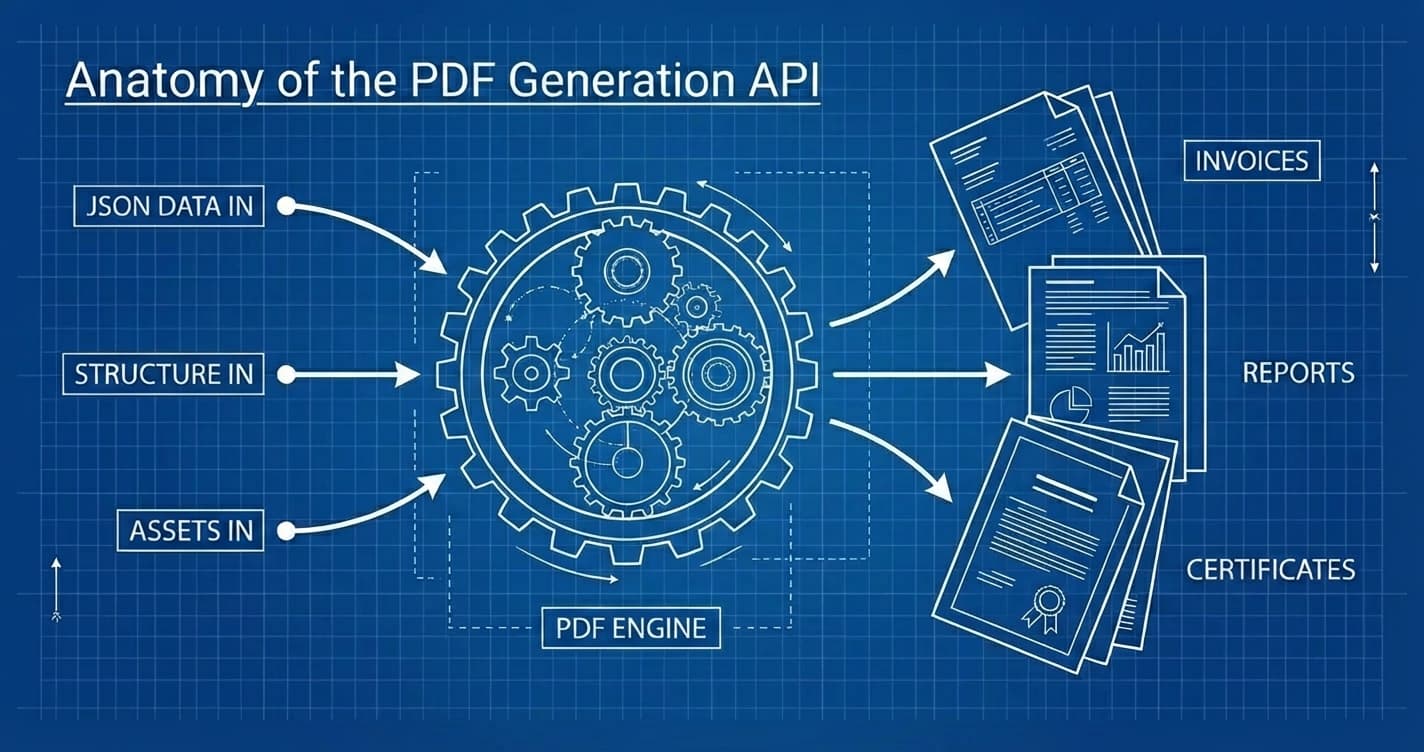
Before writing code, understand the components:
| Stage | Component | Output |
|---|---|---|
| 1. Data | Billing System | Invoice Data (JSON) |
| 2. Template | Template Engine | Template + Data Binding |
| 3. Generation | PDF Engine | Generated PDF |
| 4. Delivery | Distribution | Email / Storage |
Data Sources#
Your invoice data comes from somewhere:
- Stripe: Subscription and usage-based billing
- Your database: Custom billing logic
- CRM: Customer details
- Tax service: Tax rates and calculations
The key is normalizing this data into a consistent JSON structure.
Template#
The template defines the visual layout:
- Company branding (logo, colors, fonts)
- Invoice structure (header, line items, totals)
- Data bindings that pull values from your JSON
Generation Engine#
The engine combines template + data to produce PDFs. This is where Typcraft fits in.
Delivery#
Generated invoices need to go somewhere:
- Email to customer
- Upload to S3/cloud storage
- Attach to Stripe invoice
- Download on demand
Building with Typcraft#
Let's build a complete invoice system.
Step 1: Design the Template#
In the Typcraft editor, create an invoice template with these elements:
Header Section
- Your company logo and address
- Invoice number and date
- Due date
- Customer billing address
Line Items Table
- Description, quantity, unit price, total
- Dynamic rows that expand based on data
- Subtotal calculation
Footer Section
- Tax breakdown
- Total amount due
- Payment instructions
The editor uses a visual approach to data binding. Instead of writing template syntax, you select elements and bind them to data paths:
| Element | Data Path |
|---|---|
| Invoice number | invoice.number |
| Customer name | customer.name |
| Line item description | $item.description |
| Line item total | $item.total |
For tables, Typcraft automatically iterates over arrays. Bind a table to items, and each row uses $item to reference the current element, plus $index for the row number.
Step 2: Define Your Data Structure#
Create a TypeScript interface for invoice data:
interface InvoiceData {
  invoice: {
    number: string;
    date: string;
    dueDate: string;
    currency: string;
  };
  customer: {
    name: string;
    email: string;
    address: {
      line1: string;
      line2?: string;
      city: string;
      state: string;
      zip: string;
      country: string;
    };
  };
  items: Array<{
    description: string;
    quantity: string;
    unitPrice: string;
    total: string;
  }>;
  subtotal: string;
  tax: {
    rate: string;
    amount: string;
  };
  total: string;
}Important: All values should be pre-formatted as strings. The template displays exactly what you send. Format numbers and dates before sending.
Step 3: Generate a Single Invoice#
Typcraft uses a REST API. Here's how to generate a single invoice:
async function generateInvoice(data: InvoiceData): Promise<Blob> {
  const response = await fetch('https://typcraft.com/api/v1/generate', {
    method: 'POST',
    headers: {
      'Authorization': `Bearer ${process.env.TYPCRAFT_API_KEY}`,
      'Content-Type': 'application/json',
    },
    body: JSON.stringify({
      templateId: 'your-invoice-template-id',
      format: 'pdf',
      data: data,
      sync: true,
    }),
  });

  if (!response.ok) {
    throw new Error(`Generation failed: ${response.statusText}`);
  }

  return response.blob();
}

// Usage
const invoiceData: InvoiceData = {
  invoice: {
    number: 'INV-2026-0001',
    date: 'January 24, 2026',
    dueDate: 'February 23, 2026',
    currency: 'USD',
  },
  customer: {
    name: 'Acme Corporation',
    email: '[email protected]',
    address: {
      line1: '123 Business Ave',
      city: 'San Francisco',
      state: 'CA',
      zip: '94102',
      country: 'US',
    },
  },
  items: [
    {
      description: 'Pro Plan - Monthly',
      quantity: '1',
      unitPrice: '$29.00',
      total: '$29.00',
    },
    {
      description: 'Additional Users (5)',
      quantity: '5',
      unitPrice: '$5.00',
      total: '$25.00',
    },
  ],
  subtotal: '$54.00',
  tax: {
    rate: '8.75%',
    amount: '$4.73',
  },
  total: '$58.73',
};

const pdfBlob = await generateInvoice(invoiceData);
Step 4: Batch Generation#
For monthly billing runs, you'll generate hundreds or thousands of invoices. The approach: submit jobs in parallel, then collect results.
interface GenerationJob {
  jobId: string;
  customerId: string;
}

async function submitGenerationJob(
  templateId: string,
  data: InvoiceData,
  customerId: string
): Promise<GenerationJob> {
  const response = await fetch('https://typcraft.com/api/v1/generate', {
    method: 'POST',
    headers: {
      'Authorization': `Bearer ${process.env.TYPCRAFT_API_KEY}`,
      'Content-Type': 'application/json',
    },
    body: JSON.stringify({
      templateId,
      format: 'pdf',
      data,
    }),
  });

  const { jobId } = await response.json();
  return { jobId, customerId };
}

async function pollJobStatus(jobId: string): Promise<{
  status: 'pending' | 'processing' | 'completed' | 'failed';
  downloadUrl?: string;
  error?: string;
}> {
  const response = await fetch(
    `https://typcraft.com/api/v1/jobs/${jobId}`,
    {
      headers: {
        'Authorization': `Bearer ${process.env.TYPCRAFT_API_KEY}`,
      },
    }
  );
  return response.json();
}

async function generateMonthlyInvoices() {
  // Fetch all customers with unpaid balances
  const customers = await db.customers.findMany({
    where: {
      balance: { gt: 0 },
      status: 'active',
    },
    include: {
      subscriptions: true,
      usage: true,
    },
  });

  console.log(`Generating ${customers.length} invoices...`);

  // Submit all jobs in parallel
  const jobs = await Promise.all(
    customers.map((customer) =>
      submitGenerationJob(
        'invoice-template-id',
        transformToInvoiceData(customer),
        customer.id
      )
    )
  );

  console.log(`Submitted ${jobs.length} jobs`);

  // Poll for completion
  const results = await Promise.all(
    jobs.map(async (job) => {
      let status = await pollJobStatus(job.jobId);

      // Poll until complete (with timeout)
      const maxAttempts = 30;
      let attempts = 0;

      while (
        status.status !== 'completed' &&
        status.status !== 'failed' &&
        attempts < maxAttempts
      ) {
        await sleep(1000);
        status = await pollJobStatus(job.jobId);
        attempts++;
      }

      return {
        customerId: job.customerId,
        jobId: job.jobId,
        ...status,
      };
    })
  );

  // Process results
  for (const result of results) {
    if (result.status === 'completed' && result.downloadUrl) {
      await db.invoices.update({
        where: { customerId: result.customerId },
        data: {
          pdfUrl: result.downloadUrl,
          generatedAt: new Date(),
        },
      });

      await sendInvoiceEmail(result.customerId, result.downloadUrl);
    } else if (result.status === 'failed') {
      console.error(`Invoice failed for ${result.customerId}: ${result.error}`);
      await alertOps(`Invoice generation failed for ${result.customerId}`);
    }
  }

  console.log(`Completed: ${results.filter(r => r.status === 'completed').length}`);
  console.log(`Failed: ${results.filter(r => r.status === 'failed').length}`);
}

function sleep(ms: number): Promise<void> {
  return new Promise(resolve => setTimeout(resolve, ms));
}
For very large batches, consider using a job queue like BullMQ to manage the workflow with better retry handling and rate limiting.
Performance at Scale#
Real numbers from production systems:
| Volume | Generation Time | API Cost (Typcraft) |
|---|---|---|
| 100 invoices | ~10 seconds | $1.50 |
| 1,000 invoices | ~90 seconds | $15.00 |
| 10,000 invoices | ~12 minutes | $150.00 |
Compare this to building in-house:
- Developer time: 40-80 hours
- Server costs: $50-200/month for PDF generation infrastructure
- Maintenance: Ongoing debugging, updates, scaling
For most SaaS companies, the API approach pays for itself quickly.
Edge Cases#
Production invoice systems need to handle:
Multi-Page Invoices#
When a customer has 100+ line items, the invoice spans multiple pages. Your template needs:
- Repeating headers on each page
- Page numbers ("Page 1 of 3")
- Totals only on the last page
Typcraft handles pagination automatically. Design your template with page headers and footers, and the engine breaks pages correctly.
Multi-Currency#
International customers need invoices in their local currency. Format amounts before sending:
function formatCurrency(amount: number, currency: string): string {
  return new Intl.NumberFormat('en-US', {
    style: 'currency',
    currency,
  }).format(amount);
}

const invoiceData = {
  // ...
  total: formatCurrency(58.73, customer.currency), // "58.73 EUR"
};
Tax Jurisdictions#
Tax rules vary by location:
- US: State and local sales tax
- EU: VAT with reverse charge for B2B
- Canada: GST/HST/PST combinations
Integrate with a tax service (Avalara, TaxJar) or build jurisdiction logic:
function calculateTax(customer: Customer, amount: number) {
  if (customer.country === 'US') {
    return calculateUSSalesTax(customer.state, amount);
  } else if (isEUCountry(customer.country)) {
    return calculateVAT(customer, amount);
  }
  return { rate: 0, amount: 0 };
}
PDF/A for Archival#
Some industries require PDF/A format for long-term archival:
const response = await fetch('https://typcraft.com/api/v1/generate', {
  method: 'POST',
  headers: {
    'Authorization': `Bearer ${process.env.TYPCRAFT_API_KEY}`,
    'Content-Type': 'application/json',
  },
  body: JSON.stringify({
    templateId: 'invoice-template-id',
    format: 'pdf',
    data: invoiceData,
    options: {
      pdfA: true,
    },
  }),
});
Integration Patterns#
Stripe Webhook#
Generate invoices automatically when Stripe finalizes an invoice:
// POST /api/webhooks/stripe
export async function POST(req: Request) {
  const event = await stripe.webhooks.constructEvent(
    await req.text(),
    req.headers.get('stripe-signature')!,
    process.env.STRIPE_WEBHOOK_SECRET!
  );

  if (event.type === 'invoice.finalized') {
    const stripeInvoice = event.data.object;
    const invoiceData = transformStripeInvoice(stripeInvoice);

    const response = await fetch('https://typcraft.com/api/v1/generate', {
      method: 'POST',
      headers: {
        'Authorization': `Bearer ${process.env.TYPCRAFT_API_KEY}`,
        'Content-Type': 'application/json',
      },
      body: JSON.stringify({
        templateId: 'invoice-template-id',
        format: 'pdf',
        data: invoiceData,
        sync: true,
      }),
    });

    const pdfBlob = await response.blob();
    const pdfUrl = await uploadToS3(pdfBlob, `invoices/${stripeInvoice.id}.pdf`);

    await stripe.invoices.update(stripeInvoice.id, {
      metadata: { pdfUrl },
    });
  }

  return Response.json({ received: true });
}
Monthly Cron Job#
For custom billing, run invoice generation on a schedule:
// Triggered by cron: 0 6 1 * * (6 AM on the 1st of each month)
export async function monthlyBillingJob() {
  await generateMonthlyInvoices();

  await db.billingRuns.create({
    data: {
      completedAt: new Date(),
      status: 'completed',
    },
  });
}
On-Demand Download#
Let customers download invoices from your dashboard:
// GET /api/invoices/:id/pdf
export async function GET(req: Request, { params }: { params: { id: string } }) {
  const invoice = await db.invoices.findUnique({
    where: { id: params.id },
    include: { customer: true },
  });

  if (!invoice) {
    return Response.json({ error: 'Not found' }, { status: 404 });
  }

  // Check authorization
  const session = await getSession(req);
  if (invoice.customerId !== session.customerId) {
    return Response.json({ error: 'Forbidden' }, { status: 403 });
  }

  // Return cached PDF if available
  if (invoice.pdfUrl) {
    return Response.redirect(invoice.pdfUrl);
  }

  // Generate on demand
  const response = await fetch('https://typcraft.com/api/v1/generate', {
    method: 'POST',
    headers: {
      'Authorization': `Bearer ${process.env.TYPCRAFT_API_KEY}`,
      'Content-Type': 'application/json',
    },
    body: JSON.stringify({
      templateId: 'invoice-template-id',
      format: 'pdf',
      data: buildInvoiceData(invoice),
      sync: true,
    }),
  });

  const pdfBlob = await response.blob();
  const pdfUrl = await uploadToS3(pdfBlob, `invoices/${invoice.id}.pdf`);

  // Cache for future requests
  await db.invoices.update({
    where: { id: params.id },
    data: { pdfUrl },
  });

  return Response.redirect(pdfUrl);
}
Checklist Before Going Live#
- Template matches your brand guidelines
- All legal requirements included (tax IDs, terms)
- Data validation catches malformed input
- Error handling notifies your team of failures
- Rate limiting prevents API abuse
- PDF/A compliance if required by your industry
- Email delivery tested with real addresses
- Invoice numbers are unique and sequential
- Currency formatting correct for all locales
The Bottom Line#
Invoice automation isn't just about saving time. It's about building a billing system that scales with your business.
Start simple: one template, single generation, manual trigger. Then add batch processing and integrations as you grow.
The code in this guide is production-ready. Adapt it to your billing system and start generating.
Ready to automate your invoices? Start with Typcraft's free tier and generate your first invoice in minutes.

Continue Reading
Generate PDF API: The Complete Guide to Programmatic PDF Generation in 2026
Learn how to generate PDFs via API with code examples in cURL, Python, and Node.js. Compare top PDF generation APIs, pricing, and find the right fit.

Getting Started with Typcraft: Your First Document Template
Learn how to create your first document template in Typcraft with our step-by-step beginner's guide. Start generating professional documents in minutes.

From Design to 10,000 PDFs: Document Automation Playbook
A practical framework for automating document generation. Identify high-impact documents, choose the right tools, and calculate your ROI.