Generate PDF API: The Complete Guide to Programmatic PDF Generation in 2026
Learn how to generate PDFs via API with code examples in cURL, Python, and Node.js. Compare top PDF generation APIs, pricing, and find the right fit.
 Typcraft Team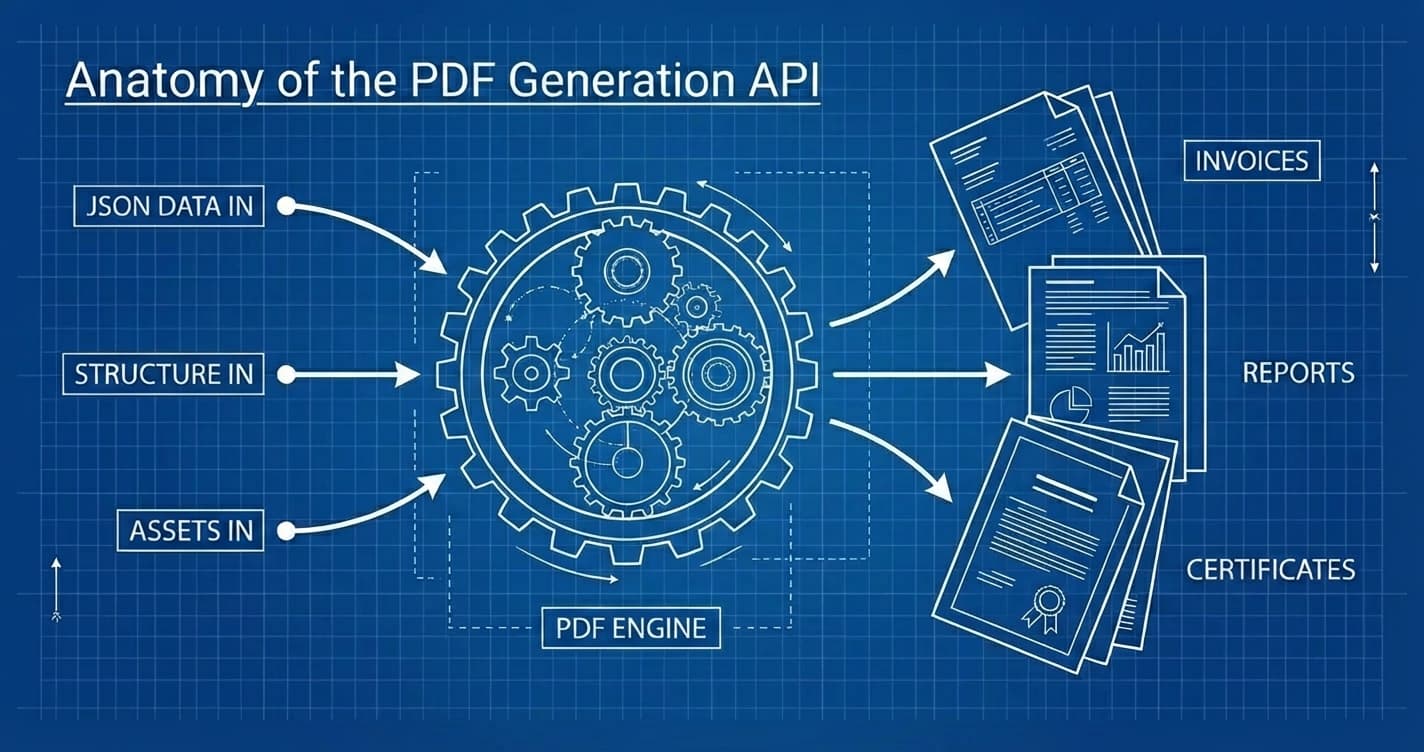
Every growing application eventually hits the same wall: you need to generate PDFs programmatically. Invoices, reports, certificates, contracts — documents that used to be created manually now need to be produced at scale, on demand, from your application code.
A generate PDF API solves this by letting you send data to an endpoint and get back a finished document. No server-side browser instances, no wrangling with print stylesheets, no managing rendering infrastructure. You make an API call, you get a PDF.
This guide covers how PDF generation APIs work, walks through real code examples, compares the major providers, and helps you pick the right one for your use case.
What Is a PDF Generation API?#
A PDF generation API is a web service that accepts structured data — typically JSON — and returns a rendered PDF document. Instead of building and maintaining your own document rendering pipeline, you outsource the hard part to a specialized service.
The typical workflow:
- Design a template in the provider's editor or define a document structure in code
- Send data via HTTP POST to the API endpoint
- Receive the PDF either synchronously (immediate response) or asynchronously (poll for completion)
Common use cases include:
- Invoices and receipts — automated billing documents triggered by payment events
- Reports and dashboards — data visualizations with charts, tables, and metrics
- Certificates — completion certificates, diplomas, awards with dynamic fields
- Contracts and proposals — multi-page documents with custom terms and signatures
- Shipping labels and packing slips — warehouse automation
The value proposition is straightforward: you focus on your application logic, the API handles document rendering.
How PDF Generation APIs Work#
Not all PDF APIs work the same way. The rendering approach determines everything — speed, output quality, and what you can build. There are three main architectures.
The HTML-to-PDF Approach#
Most PDF generation APIs use a headless browser (usually Chromium via Puppeteer or Playwright) to render HTML/CSS and export the result as a PDF. You write HTML templates, inject data, and the browser "prints" the page.
Advantages: Familiar technology. If your team knows HTML and CSS, you can create templates immediately.
Drawbacks: Browsers were designed for screens, not paper. This causes real problems in production:
- Font rendering inconsistencies between environments
- Tables breaking mid-row across pages
- Slow generation (500ms–2s per page, much worse for long documents)
- High memory usage (each render spins up a full browser instance)
- CSS print support is incomplete and inconsistent
For a deeper look at these issues, see our post on why HTML-to-PDF always disappoints.
The Template Editor Approach#
Some providers offer drag-and-drop template editors. You design your document visually, define data placeholders, and the API fills them in at generation time.
Advantages: No coding required for template design. Business users can create and modify templates without developer involvement.
Drawbacks: Limited flexibility. Complex layouts, conditional logic, and programmatic control are constrained by what the editor supports. You're also locked into the provider's template format.
The Typesetting Approach#
A newer category uses purpose-built typesetting engines instead of browsers. Typst is the leading example — a modern document formatting system that compiles directly to PDF primitives.
Advantages:
- 10-50x faster than browser-based rendering
- Pixel-perfect output with native typography (proper kerning, ligatures, OpenType features)
- Consistent results across all environments
- Built-in pagination with headers, footers, and page numbers that just work
- Tiny resource footprint (no browser binary)
Drawbacks: Different syntax from HTML/CSS. There's a learning curve if your team has never worked with a typesetting system. However, APIs like Typcraft abstract away the Typst syntax behind a visual editor and JSON-based document definitions.
Quick Start: Generate Your First PDF via API#
Let's generate a real PDF. These examples use the Typcraft API, but the pattern is similar across providers: authenticate, send document data, receive the file.
Prerequisites#
- Create a free account at typcraft.com
- Create an API key in your API key settings
- Create a template in the editor (or use the default)
Using cURL#
curl -X POST https://typcraft.com/api/v1/generate \
  -H "Authorization: Bearer tc_live_YOUR_API_KEY" \
  -H "Content-Type: application/json" \
  -d '{
    "templateId": "your-template-id",
    "format": "pdf",
    "data": {
      "title": "Monthly Report",
      "date": "February 2026",
      "items": [
        { "name": "Revenue", "value": "$125,000" },
        { "name": "Expenses", "value": "$89,000" },
        { "name": "Net Profit", "value": "$36,000" }
      ]
    },
    "sync": true
  }' \
  --output report.pdf
The sync: true flag tells the API to wait for generation and return the PDF directly in the response body. Without it, you'll receive a job ID for polling.
Using Python#
import requests

API_KEY = "tc_live_YOUR_API_KEY"
TEMPLATE_ID = "your-template-id"

response = requests.post(
    "https://typcraft.com/api/v1/generate",
    headers={
        "Authorization": f"Bearer {API_KEY}",
        "Content-Type": "application/json",
    },
    json={
        "templateId": TEMPLATE_ID,
        "format": "pdf",
        "data": {
            "title": "Monthly Report",
            "date": "February 2026",
            "items": [
                {"name": "Revenue", "value": "$125,000"},
                {"name": "Expenses", "value": "$89,000"},
                {"name": "Net Profit", "value": "$36,000"},
            ],
        },
        "sync": True,
    },
)

if response.status_code == 200:
    with open("report.pdf", "wb") as f:
        f.write(response.content)
    print("PDF saved to report.pdf")
else:
    print(f"Error: {response.status_code} - {response.text}")
Using Node.js#
const API_KEY = "tc_live_YOUR_API_KEY";
const TEMPLATE_ID = "your-template-id";

const response = await fetch("https://typcraft.com/api/v1/generate", {
  method: "POST",
  headers: {
    Authorization: `Bearer ${API_KEY}`,
    "Content-Type": "application/json",
  },
  body: JSON.stringify({
    templateId: TEMPLATE_ID,
    format: "pdf",
    data: {
      title: "Monthly Report",
      date: "February 2026",
      items: [
        { name: "Revenue", value: "$125,000" },
        { name: "Expenses", value: "$89,000" },
        { name: "Net Profit", value: "$36,000" },
      ],
    },
    sync: true,
  }),
});

if (response.ok) {
  const buffer = await response.arrayBuffer();
  // Node.js
  const fs = await import("fs");
  fs.writeFileSync("report.pdf", Buffer.from(buffer));
  console.log("PDF saved to report.pdf");
} else {
  console.error(`Error: ${response.status} - ${await response.text()}`);
}
Understanding the Response#
With sync: true, the API returns the binary PDF directly:
- Status 200: PDF in the response body.
Content-Type: application/pdf. - Status 202: Generation is taking longer than the timeout. You'll get a
jobIdto poll. - Status 402: Insufficient credits.
- Status 404: Template not found.
For async generation (the default), you receive a job ID immediately:
{ "jobId": "550e8400-e29b-41d4-a716-446655440000" }Poll for status at GET https://typcraft.com/api/v1/jobs/{jobId}, then download the result at GET https://typcraft.com/api/v1/jobs/{jobId}/download when the status is completed.
For a complete guide to async generation and batch processing, see our batch invoice generation tutorial.
Best PDF Generation APIs Compared (2026)#
There's no single best API — it depends on your volume, budget, and technical requirements. Here's how the major providers compare.
| Feature | Typcraft | PDF Generator API | APITemplate.io | CraftMyPDF | Nutrient |
|---|---|---|---|---|---|
| Rendering engine | Typst (native) | Headless browser | Headless browser | Template engine | Native SDK |
| Template design | Visual editor + code | Drag-and-drop | HTML/CSS | Drag-and-drop | Code only |
| Output formats | PDF, PNG, SVG | PDF, PNG | PDF, PNG | ||
| Free tier | 100 credits/mo | Limited trial | 50/mo | 100/mo | Trial only |
| Starting price | $15/mo | $24.95/mo | $19/mo | $39/mo | Enterprise |
| Charts built-in | Yes | No | No | Limited | No |
| QR codes | Yes | No | Via HTML | Limited | No |
| Sync generation | Yes | Yes | Yes | Yes | N/A (SDK) |
| Async + polling | Yes | Yes | Yes | Yes | N/A |
Typcraft#
Uses Typst under the hood for fast, consistent rendering. The visual editor produces a JSON document definition that maps to Typst code — you don't need to learn Typst syntax directly. Built-in support for charts (bar, pie, line, scatter), QR codes, and complex layouts. Best for teams that want both a visual editor and programmatic API access.
PDF Generator API#
One of the earliest template-based PDF APIs. Strong drag-and-drop editor with data binding. Good for simple documents like invoices and receipts. The browser-based rendering means longer generation times for complex documents.
APITemplate.io#
HTML/CSS-based approach. If your team already has HTML templates, migration is straightforward. Supports dynamic images and barcodes. Limited by the inherent constraints of browser-to-PDF conversion.
CraftMyPDF#
Template editor with a marketplace of pre-built templates. Good starting point if you don't want to design from scratch. Pricing is higher for the features offered compared to alternatives.
Nutrient (formerly PSPDFKit)#
Enterprise-grade SDK for organizations that need on-premise deployment and full PDF manipulation (annotation, signing, redaction). Overkill for most generation-only use cases, but unmatched for document workflow needs.
When to Choose What#
- Typcraft: You need fast generation, built-in charts, and both visual editing and API access
- PDF Generator API: You want a simple drag-and-drop editor for basic documents
- APITemplate.io: You have existing HTML templates and want a quick API wrapper
- CraftMyPDF: You want pre-built templates to get started quickly
- Nutrient: You need enterprise PDF manipulation beyond generation
Common Use Cases for PDF APIs#
Invoices and Receipts#
The most common use case. Every SaaS with paid customers needs automated invoicing. A typical integration triggers PDF generation from a Stripe webhook or billing cron job.
Key requirements:
- Dynamic line items table
- Multi-currency formatting
- Tax calculation display
- Sequential invoice numbering
- PDF/A support for archival compliance
We covered this in detail in our batch invoice generation guide.
Reports and Dashboards#
Business intelligence teams need to distribute reports as PDFs — board decks, monthly KPI reports, client-facing analytics.
What makes this challenging:
- Charts and data visualization — bar charts, pie charts, line graphs need to render directly in the PDF
- Dynamic page count — reports vary in length based on data
- Consistent formatting — tables, headers, and footers must align across pages
APIs with built-in chart support (like Typcraft) have a significant advantage here. You send the chart data as JSON, and the API renders it natively — no image generation step, no external charting library.
Certificates and Diplomas#
Course completion certificates, event badges, awards. These are typically single-page documents with:
- Custom fonts and branding
- Dynamic recipient name and date
- Background images or patterns
- Sometimes a verification QR code
The key requirement is pixel-perfect output. Recipients notice if text is misaligned or fonts look off. Native rendering engines handle this better than browser-based approaches.
Contracts and Legal Documents#
Multi-page documents with:
- Numbered clauses and sections
- Running headers and footers with page numbers
- Signature blocks
- Terms and conditions in smaller text
Legal documents demand consistent pagination and typography. A clause that shifts to a different page between generations can cause confusion.
Key Features to Look for in a PDF Generation API#
When evaluating providers, prioritize these capabilities:
Rendering quality: Does the output look professional? Check font rendering, table alignment, and page break behavior. Request sample PDFs from your actual templates.
Generation speed: For sync workflows, latency matters. Browser-based APIs typically take 1-3 seconds per page. Native engines can be 10-50x faster.
Output format flexibility: Some use cases need PNG (for email embedding) or SVG (for web display) in addition to PDF. Check what formats are supported from the same template.
Authentication and security: API keys with scoped permissions, HTTPS-only, and no data retention after generation. Your documents may contain sensitive financial or personal data.
Error handling: Clear error messages with specific codes. When generation fails, you need to know why — insufficient credits, invalid template, malformed data, or rendering error.
Scalability: Rate limits, concurrent request handling, and queue management for batch operations. If you're generating thousands of documents monthly, the API needs to handle bursts.
Rich content support: Tables, charts, images, QR codes, custom fonts. The more the API handles natively, the less custom work you need.
What Does PDF Generation Actually Cost?#
Pricing varies significantly across providers. Here's a realistic cost breakdown.
Typcraft Pricing#
| Plan | Monthly Cost | Credits | Cost per Credit |
|---|---|---|---|
| Hobby | Free | 100 | $0.00 |
| Starter | $15 | 1,500 | $0.010 |
| Pro | $29 | 3,000 | $0.010 |
| Scale | $99 | 15,000 | $0.007 |
| Business | $199 | 40,000 | $0.005 |
A simple single-page PDF costs 1 credit. Multi-page documents use more. At the Scale tier, that's roughly $0.007 per page — less than a penny.
For pay-as-you-go, credit packs are available:
| Pack | Credits | Price | Cost per Credit |
|---|---|---|---|
| Mini | 400 | $5 | $0.013 |
| Standard | 1,200 | $15 | $0.013 |
| Plus | 5,000 | $49 | $0.010 |
| Jumbo | 15,000 | $129 | $0.009 |
| Mega | 50,000 | $349 | $0.007 |
Credit packs never expire, so they're ideal for unpredictable workloads.
Cost Comparison Across Providers#
For 1,000 single-page PDFs per month:
| Provider | Approximate Monthly Cost |
|---|---|
| Typcraft (Starter) | $15 |
| APITemplate.io | $19 |
| PDF Generator API | $24.95 |
| CraftMyPDF | $39 |
| Nutrient | Custom (enterprise) |
Build vs. Buy#
The alternative to an API is building your own pipeline. The real costs:
- Development time: 40-100 hours to build a reliable PDF generation system
- Infrastructure: $50-200/month for servers, headless browser instances, and storage
- Maintenance: Ongoing updates, security patches, and debugging rendering issues
- Scaling: Adding capacity when volume grows requires engineering effort
For most teams, the API pays for itself within the first month of development time saved. At $15/month for 1,500 credits, it's cheaper than a few hours of developer time.
Advanced Features#
Beyond basic generation, modern PDF APIs offer capabilities that would be complex to build yourself.
Multiple Output Formats#
Generate PDF, PNG, and SVG from the same template and data. This is useful when you need:
- PDF for download and printing
- PNG for embedding in emails (many email clients can't display PDFs inline)
- SVG for web display with sharp rendering at any zoom level
With Typcraft, just change the format field in your API request:
// PDF for download
{ "templateId": "...", "format": "pdf", "data": {...} }

// PNG for email
{ "templateId": "...", "format": "png", "data": {...}, "dpi": 144 }

// SVG for web
{ "templateId": "...", "format": "svg", "data": {...} }
Built-in Charts#
Typcraft supports bar, pie, line, and scatter charts natively. You define the chart type and data in your template, and the rendering engine produces publication-quality visualizations directly in the PDF.
This eliminates the common workaround of generating chart images separately (via Chart.js or similar), uploading them, and embedding them in the document. The data stays in JSON, and the chart is rendered as part of the document.
QR Codes#
Native QR code generation for:
- Payment links on invoices
- Verification URLs on certificates
- Product tracking on shipping labels
Define the QR content in your template data, and the API renders it at the specified size and color.
Custom Fonts#
Upload your brand fonts and use them across all templates. Native rendering engines handle custom fonts better than browser-based tools because there's no font substitution risk — the engine either has the font or returns an error.
Frequently Asked Questions#
What is the best free PDF generation API?#
Most providers offer a free tier with limited credits. Typcraft provides 100 free credits per month with access to PDF, PNG, and SVG output. This is enough for prototyping and low-volume use. For open-source self-hosted options, you can use Puppeteer directly, but you'll need to manage the infrastructure yourself.
How do I generate a PDF from an API?#
Send a POST request to the provider's generation endpoint with your template ID, output format, and data as JSON. With sync mode, you receive the PDF binary directly in the response. With async mode, you receive a job ID and poll for completion. See the code examples above in cURL, Python, and Node.js.
Can I generate PDFs with charts and graphs via API?#
Yes, but support varies. Most HTML-to-PDF APIs require you to generate chart images separately and embed them. Typcraft renders bar, pie, line, and scatter charts natively as part of the document — you just include the chart data in your JSON payload.
What's the difference between HTML-to-PDF and template-based PDF APIs?#
HTML-to-PDF APIs render your HTML/CSS using a headless browser and export the result. Template-based APIs use their own rendering engine with a visual template editor. HTML-to-PDF is more flexible but slower and less consistent. Template-based APIs offer faster rendering and better output quality but require learning the provider's template system.
How fast can a PDF API generate documents?#
It depends on the rendering engine. Browser-based APIs typically take 1-3 seconds per page. Native engines like Typst can generate a single-page PDF in 10-50 milliseconds. For a detailed comparison, see our post on browser vs. native PDF engines.
Is there a PDF generation API with a free tier?#
Yes. Typcraft offers 100 free credits per month on the Hobby plan. APITemplate.io offers 50 per month. CraftMyPDF offers 100 per month. Most free tiers include the full API with lower volume limits.
Choosing the Right PDF API#
The right choice depends on three factors:
- Volume: Under 100 documents per month? Start with a free tier. Over 10,000? Negotiate enterprise pricing.
- Complexity: Simple single-page documents work with any provider. Charts, multi-page layouts, and conditional logic favor more capable engines.
- Integration depth: If you need sync generation for real-time user requests, check latency. If you're batch-processing overnight, async with polling is fine.
Start with a free tier, generate a few real documents with your actual data, and evaluate the output quality and speed before committing.
Ready to generate your first PDF? Start with Typcraft's free tier — 100 credits per month, no credit card required.

Continue Reading

From Design to 10,000 PDFs: Document Automation Playbook
A practical framework for automating document generation. Identify high-impact documents, choose the right tools, and calculate your ROI.

Batch Invoice Generation at Scale: Complete API Guide
Build automated invoice generation for your SaaS. From template design to 10,000 invoices per hour with working code examples.
Nutrition Facts Label Font: What FDA Labels Use
Learn what font style Nutrition Facts labels use, whether FDA requires Helvetica, and which free font alternatives work for FDA-style layouts.