Nutrition Facts Label Font: What FDA Labels Use
Learn what font style Nutrition Facts labels use, whether FDA requires Helvetica, and which free font alternatives work for FDA-style layouts.
 Typcraft Team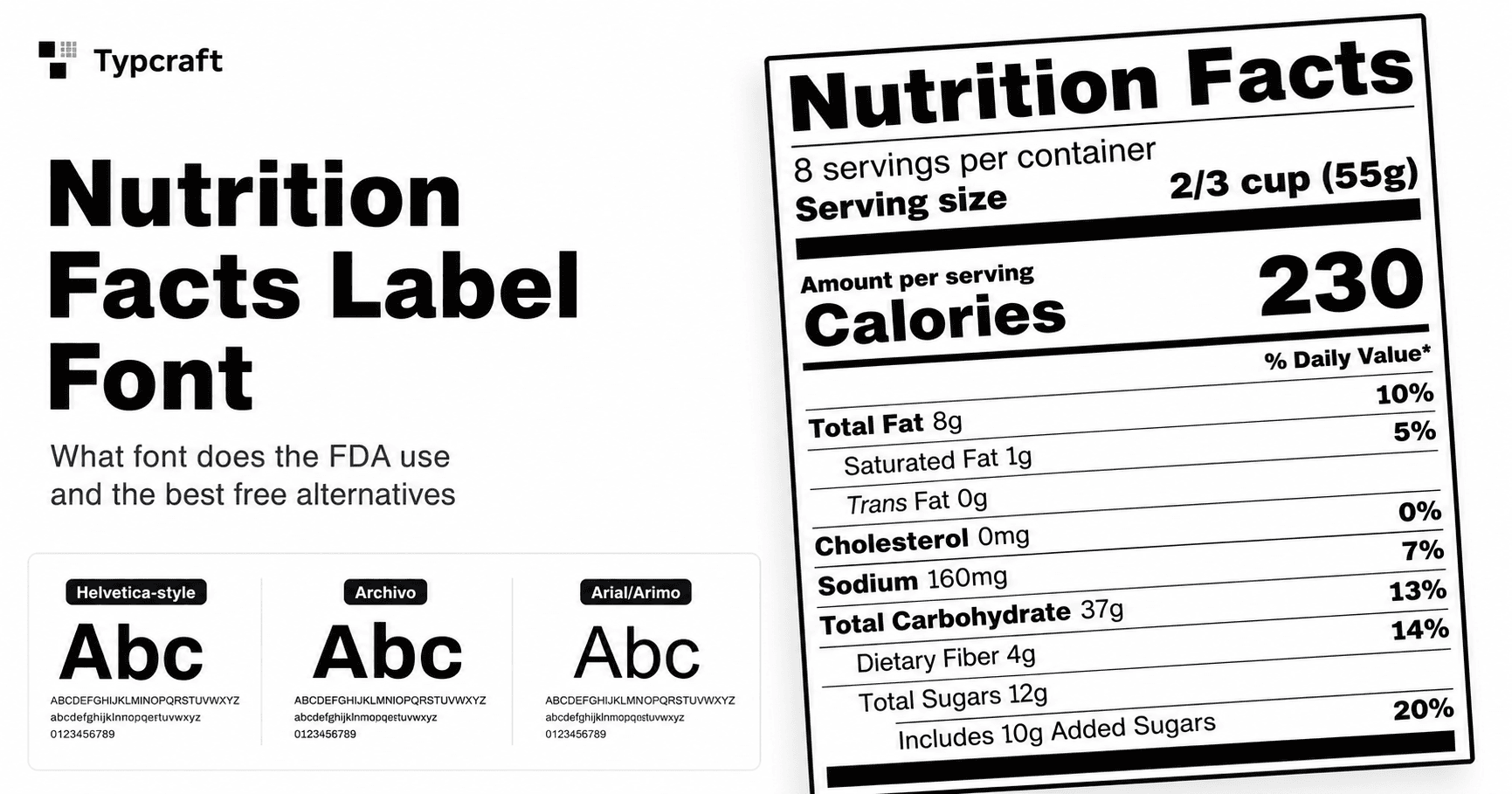
The Nutrition Facts label font is usually a Helvetica-style sans-serif, with heavy bold text for the title, Calories, major nutrient names, and % Daily Value amounts. FDA rules focus on readability, required information, type size, prominence, spacing, and label format rather than naming one paid font family that every label must use.
What font is used on Nutrition Facts labels?#
Official FDA examples are built around a compact sans-serif look similar to Helvetica. The visual hierarchy matters as much as the font family: "Nutrition Facts" is very bold, Calories is large and bold, primary nutrients are emphasized, sub-nutrients are lighter or indented, and % Daily Value values align on the right.
That is why Nutrition Facts labels often look wrong when they use a generic web font, a condensed display face, or inconsistent bold weights. Even if the data is correct, the label can feel off when the title is too light, the calorie number is too small, or the nutrient rows do not align cleanly.
Does the FDA require Helvetica?#
The FDA's nutrition labeling rule in 21 CFR 101.9 describes label content, format, type style, type size, contrast, hairlines, and required declarations. It does not simply say every Nutrition Facts label must use one licensed Helvetica file.
The practical target is a single easy-to-read sans-serif style that matches the FDA layout. If you use a Helvetica-compatible commercial font, that can be appropriate. If you use a free substitute, choose one with enough weights to support the title, Calories, primary nutrients, and right-aligned %DV values.
The FDA Food Labeling Guide is a useful reference for the broader food labeling context, but it should not be treated as legal review for a specific product package.
FDA Nutrition Facts typography checklist#
Use this checklist when reviewing a Nutrition Facts label:
- Use one clean, easy-to-read sans-serif type style.
- Make "Nutrition Facts" the strongest text element.
- Make Calories large and bold enough to dominate the calories section.
- Use bold emphasis for primary nutrients such as Total Fat, Cholesterol, Sodium, Total Carbohydrate, and Protein.
- Keep sub-nutrients visually secondary with indentation and lighter emphasis.
- Right-align % Daily Value values so the column is easy to scan.
- Keep dividers and section bars black, crisp, and consistent with the label hierarchy.
- Preserve the standard Daily Value footnote area and readable small text.
Typography is only one part of the label. Serving size, nutrient order, Daily Value calculations, rounding, claims, ingredients, allergens, and package-specific rules still need proper review.
Free font alternatives for Nutrition Facts labels#
If you cannot license Helvetica, use a free sans-serif family that has reliable regular, bold, and extra-bold or black weights. Good candidates include:
- Archivo for strong title and nutrient emphasis.
- Arimo when you need a metric-compatible Helvetica-like baseline for regular text.
- Roboto for clean general readability, though it may need careful weight tuning.
- Inter for readable UI-style labels, though it can feel less like the FDA sample if used without heavier weights.
For the closest FDA-style feel, the font family is only half the decision. You still need to tune font size, weight, line height, divider thickness, row spacing, indentation, and right alignment.
Create a label with the correct Nutrition Facts layout#
Typcraft's free nutrition label generator creates an FDA-style Nutrition Facts label PDF from form inputs. Enter serving information, calories, nutrient amounts, and optional vitamins or minerals, then download a print-ready PDF without signup.
If you need design control, batch generation, or API access, start from the editable FDA Nutrition Facts label template. The template lets you adjust typography and spacing in the visual editor while keeping nutrient values data-bound.
Neither tool replaces nutrition analysis or legal review. Use them for layout, formatting, PDF generation, and workflow automation; verify your final label against the rules and guidance that apply to your product.
Frequently asked questions#
What font is closest to Nutrition Facts labels?#
Helvetica-style sans-serif fonts are the closest visual match. Archivo can work well for heavier title and nutrient emphasis, while Arimo is a useful free Helvetica-like option for regular text.
Does the FDA require Helvetica on Nutrition Facts labels?#
FDA rules focus on type style, readability, type size, contrast, and layout. They do not require every label to use one specific licensed Helvetica font file.
Can I use free fonts for a Nutrition Facts label?#
Yes, but choose a readable sans-serif family with enough weights for the full hierarchy. The final label still needs review for all FDA labeling requirements, not just typography.

Continue Reading

Generate PDF API: The Complete Guide to Programmatic PDF Generation in 2026
Learn how to generate PDFs via API with code examples in cURL, Python, and Node.js. Compare top PDF generation APIs, pricing, and find the right fit.

From Design to 10,000 PDFs: Document Automation Playbook
A practical framework for automating document generation. Identify high-impact documents, choose the right tools, and calculate your ROI.

Getting Started with Typcraft: Your First Document Template
Learn how to create your first document template in Typcraft with our step-by-step beginner's guide. Start generating professional documents in minutes.